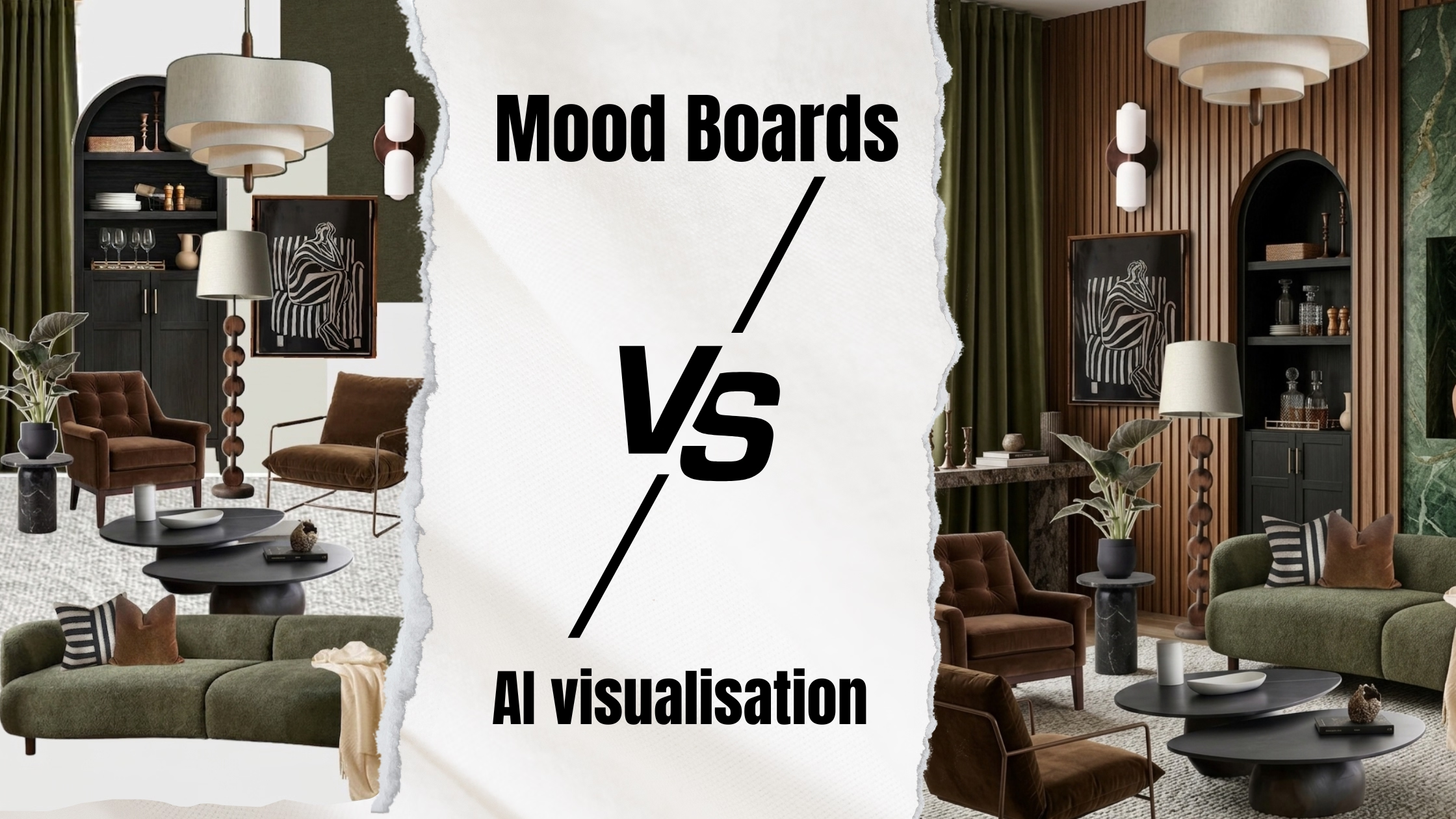
Client Can't "Picture It"? Stop Using Mood Boards
 Amanda Mao
"I love the concept. I just… I can't picture it."
If you're an interior designer, you've heard this. The colour palette is approved. The furniture is selected. The client is excited. And yet — they won't sign.
This isn't a client problem. It's a presentation problem. And it costs UK designers thousands of pounds every month.
This guide explains exactly why it happens, and how AI room visualisation is helping designers close projects faster, reduce revision rounds, and increase their proposal acceptance rate by up to 55%.
Why Most Clients Can't Visualise a Design From a Mood Board
Mood boards are essential for your creative process. But they're poor decision-making tools for clients — and here's the cognitive reason why.
When you present a mood board, you're asking a client to perform mental spatial assembly — combining a sofa from one image, lighting from another, a colour palette from a third, and a floor plan of their actual room, all inside their head. Research in spatial cognition consistently shows that fewer than one in three people can reliably do this.
The result is decision paralysis. Not because they dislike your design — because they're afraid of committing to something they can't fully see.
What a mood board actually asks a client to do:
Mentally extract a sofa from a staged showroom and place it in their own room
Imagine how a fabric swatch looks under their specific lighting conditions
Imagine how separate visuals come together as a complete, lived-in space
What AI visualisation does instead:
Shows their actual room, with your actual design choices, in under 60 seconds
Eliminates the imagination gap entirely
Turns "I think I like it" into "Yes, I can see it — let's go ahead"
The Real Cost of the "I Can't Picture It" Problem
Let's quantify what presentation uncertainty is costing your practice.
Time lost per undecided project:
2–3 months average sign-off delay
3–5 revision cycles
4–6 hours of additional client meetings
Revenue impact:
~30% of initial consultations never convert to signed projects
15–20% of projects stall indefinitely after the proposal stage
Each lost referral (from a client who felt uncertain) represents a full project value
One London-based e-design consultant described it simply: "I was spending more time convincing clients than I was designing. I couldn't scale — every project needed more of me."
What Changes When Clients Can See Their Room, Not Imagine It
Here's the core shift that AI room visualisation creates:
Before: "Can you imagine this beige sofa in your living room?"
After: "Here's your living room with the beige sofa."
One requires imagination. The other requires eyes.
When clients can see a photorealistic render of their own space — their actual walls, their windows, their proportions — with your design applied to it, the decision becomes concrete. The fear of making the wrong choice disappears because they're no longer guessing.
This is why designers using live AI visualisation in client consultations report:
Proposal acceptance rates rising from ~45% to ~70%
Revision requests dropping by 40%
Time spent on each project falling by up to 8 hours
How the Live Visualisation Workflow Works
You don't need a new process — you need one new tool inserted at the right moment.
Step 1 — Discovery (unchanged)
Understand your client's needs, lifestyle, and style preferences. Have them send photos of their space, or take them yourself.
Step 2 — The Design Consultation (this is where it changes)
Old workflow:
I'm thinking a navy sofa here, with brass accents..."
Client: "Hmm, I'm not sure. Can you show me?"
You: "I'll put together a mood board and send it over."
(Three days later) "I'm still not sure about the blue...
New workflow with AI visualisation:
I'm thinking a navy sofa here. Let me show you."
(30 seconds later) — client sees their living room with the navy sofa.
"Oh! I see it now. Can we try a lighter blue?"
"Of course." (30 seconds later) — lighter blue sofa appears.
"Perfect. Let's do it.
The feedback loop is instant. There's no waiting, no guessing, no follow-up email chain trying to describe what you meant.
Step 3 — Iterate together, live
Swap furniture. Change colours. Try different lighting. Every change takes seconds. You're no longer presenting a finished design for approval — you're co-creating it with your client in real time.
Clara: AI Visualisation Built for Interior Design Professionals
Clara by GenesiAI is designed specifically for interior designers who present to clients.
What Clara does:
Generates photorealistic renders of a client's actual room in under 60 seconds
Lets you swap furniture, finishes, and colours live during a consultation
Works from a photo of the client's space — no 3D modelling required
Runs on a tablet or laptop, making it presentation-ready without technical setup
What it doesn't require:
3D modelling skills
Expensive hardware
A lengthy learning curve — most designers are generating client-ready renders within 10 minutes
Common Objections — Answered
"Mood boards are part of my creative process. I don't want to give them up."
You don't have to. Use mood boards for your own ideation. Use AI renders for client-facing presentations. They're not competing — they're complementary.
"Won't this look less crafted and personal?"
The opposite. Showing a client their own room — not a generic staged image — is the most personalised presentation you can give. It signals that you've listened and you understand their space.
"What if the render doesn't perfectly match my vision?"
You're still the designer. The AI renders what you specify — your furniture choices, your colour palette, your layout. It's a visualisation tool, not a creative substitute. Think of it like a calculator: it doesn't do the maths for you, it just does it faster.
"My clients enjoy the big reveal at the end of a project."
They enjoy reveals when the result matches their expectations. They're disappointed — and sometimes don't refer you — when it doesn't. AI visualisation means every reveal is one they've already seen and approved.
The Psychology Behind "I Need to See It"
When a client says they can't picture something, they're rarely saying they dislike your design. They're telling you they're afraid of making a £10,000 mistake on something they can't fully see.
Visual certainty removes that fear. It's not about convincing them — it's about giving them the confidence to decide.
Interior designers who adopt live visualisation consistently report that clients become more decisive, not just faster. Because they've seen it. They own the decision. It's theirs.
Implementation: Your First Week
Day 1: Sign up for Clara and upload a photo from a recent project. Generate one render. See what your client would have seen.
Days 2–3: Prepare your next client consultation with both a mood board and 2–3 AI renders of key design elements. Present both. Ask which helped them visualise better.
Week 2: Refine your render generation process with Clara.
Month 1: Track your proposal acceptance rate and revision requests against your baseline. Measure the difference.
Month 3: Update your website and proposals to include "See your space before you commit" — and adjust your pricing to reflect the additional certainty you're delivering.
Frequently Asked Questions
What is AI room visualisation for interior designers?
AI room visualisation is a technology that takes a photo of a client's existing room and generates a photorealistic render showing your proposed design applied to their actual space. It replaces the need for clients to imagine what a design might look like.
How long does it take to generate an AI interior design render?
With tools like Clara, most renders generate in under 60 seconds from a room photo, without requiring any 3D modelling or technical expertise.
Does AI visualisation replace mood boards?
No — mood boards are useful for a designer's creative process. AI room renders are used at the client-facing presentation stage, where the goal is a confident decision rather than creative inspiration.
Can AI visualisation tools work during a live client meeting?
Yes. Clara is designed to run on a tablet or laptop during a Zoom call or in-person consultation, allowing designers to show and iterate on design options in real time.
Will using AI visualisation affect my pricing?
Most designers who adopt AI visualisation increase their prices — because they're delivering greater certainty and a more premium client experience. The value to the client is higher, not lower.
The Bottom Line
Mood boards are for inspiration. Renders are for decisions.
Your clients don't need to picture it. They need to see it.
When they can see their own room — their walls, their light, their proportions — with your design in it, the decision becomes easy. That certainty is what closes projects.
Clara is built by GenesiAI for interior design professionals. If you found this useful, share it with a designer who's still losing projects to "I just can't picture it."