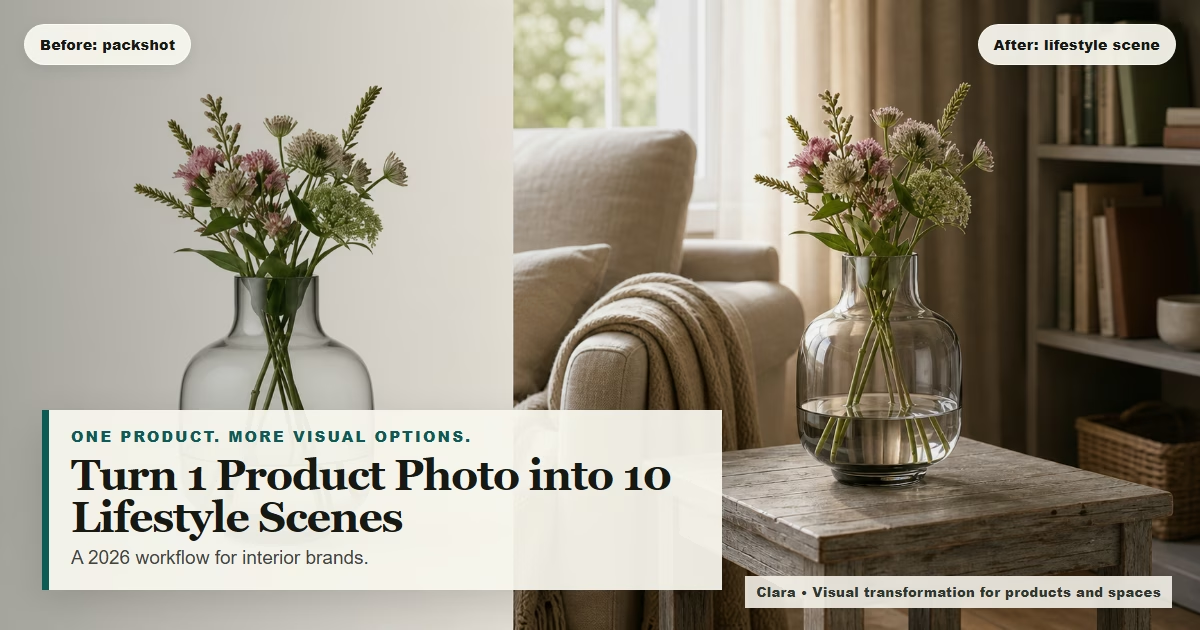
Lifestyle Product Photography in 2026: Turn One Packshot Into 10 Campaign-Ready Scenes (Without a Studio)
 Amanda Mao
The problem: your product photos look “fine”… but they don’t sell the story
If you run an interior brand or showroom, you already know the pattern:
Your white-background packshots are tidy and consistent.
Your site looks “professional.”
But customers still hesitate—because they can’t picture the product in a real space.
That gap between “nice product photo” and “I can see it in my home” is where sales slow down.
In 2026, the demand isn’t just for better photography. It’s for more context:
How does this sofa look in a bright rental living room vs a darker townhouse?
Does the rug overwhelm a small space?
Does the chair feel modern, warm, minimal, or classic when styled in-room?
And the challenge is obvious: you can’t book a studio shoot every week just to keep up with ads, launches, seasonal edits, and platform-specific crops.
This guide shows a practical approach many interior brands are moving toward:
1) Keep photography for hero assets
2) Use an AI visual transformation layer for scalable lifestyle variations
3) Build a repeatable “image system” that works for product pages, ads, email, and Pinterest
What “lifestyle product photography” means in 2026 (and why Shopify still pushes it)
Lifestyle product photography simply means: show the product in use, in a believable environment.
That’s not a “trend.” It’s a conversion tool. Shopify’s 2026 product photography guidance still emphasizes capturing the right mix of images and includes lifestyle/in-use shots as a core type. (Use Shopify’s guide as a baseline for what ecommerce buyers expect.) Source: https://www.shopify.com/blog/195059273-product-photography-guide?mid=28026
The takeaway for interior brands:
Packshots help with clarity and catalog consistency.
Lifestyle scenes help customers decide.
Both matter. The question is how to produce enough lifestyle scenes to keep up—without production bottlenecks.
Why this matters now: visual discovery is a buying channel (not a “nice to have”)
Pinterest continues to position itself as a trend and planning engine, including in its official Pinterest Predicts™ 2026 materials. For interior brands, this is a reminder that “in-room” imagery isn’t just content—it’s discoverability and demand capture. Sources: https://business.pinterest.com/en-ca/blog/pinterest-predicts-2026-turn-trends-into-unlimited-possibilities/ https://business.pinterest.com/en-gb/pdf/pinterest-predicts/2026-marketing-playbook
If you’re selling furniture, lighting, homeware, or décor, you’re competing in a visual market:
People save and compare what “fits their vibe.”
They want realistic context (scale, light, mood).
They expect variety (angles, rooms, usage).
The brands that win aren’t always the ones with the biggest budgets. They’re the ones that can consistently produce credible, on-brand variations.
The modern workflow: hero photography + scalable lifestyle scenes
Let’s make one thing clear:
You don’t need to fire your photographer.
The best-performing brands usually do a hybrid approach:
Use traditional photography for (high value, low volume)
Hero images for the homepage and big launches
Detail shots where texture/finish accuracy is essential
PR and print assets (where you want full creative control)
Use visual transformation for (high volume, high variation)
Lifestyle scenes for ads and retargeting
“In-room” product page images
Seasonal refreshes (spring, autumn, holiday)
Pinterest pins and carousel content (multiple variations fast)
Clara is designed for this second layer: turning ordinary product photos into persuasive, photorealistic visuals—without requiring you to be a prompt expert.
The “10 scenes from one packshot” system (step-by-step)
Here’s a repeatable system you can run weekly.
Step 1: Capture a “transformation-ready” product photo (10 minutes)
You can start with a packshot-style image (even from a phone), as long as it’s:
Sharp focus (no blur)
Even lighting (near a window works)
Clean edges (product fully visible)
Minimal shadows (so the product is easier to place into scenes)
If you’re photographing furniture or larger items, aim for:
A straight-on angle for the main “catalog” view
A 3/4 angle for depth
One close-up for texture and finish
Practical tip: consistency matters. Community feedback from product photographers often flags “lighting inconsistency” and “cropping/angle mismatch” as common causes of listings looking messy over time. Reference: https://www.reddit.com/r/ProductPhotos/comments/1thl1m7/common_mistakes_people_make_when_photographing/
Step 2: Decide your “scene set” before you generate anything (15 minutes)
The biggest mistake brands make with AI visuals is generating random scenes that don’t match their buyer.
Instead, pick 10 scenes that map to real shopping contexts. For interior brands, a strong starter set is:
1. Bright modern apartment living room 2. Warm neutral family home living room 3. Small-space rental (tight framing, practical) 4. High-end editorial interior (aspirational) 5. Bedroom setting (if relevant) 6. Home office setting (if relevant) 7. Close “detail vignette” (texture, materials, accessories) 8. Seasonal variation (spring light / autumn warmth) 9. Night/evening ambience (lamps on, cozy) 10. Minimal “catalog lifestyle” (clean, uncluttered)
This becomes your reusable scene library. When your product line changes, the scenes stay the same—so your brand looks consistent.
Step 3: Generate lifestyle variations in Clara (30–60 minutes for a batch)
With Clara, the goal isn’t “infinite novelty.” It’s controlled variation: consistent style, believable lighting, and practical commercial outputs.
Workflow:
1) Upload your product image
2) Choose the room type and style direction
3) Generate multiple variations
4) Keep the best versions that look credible and on-brand
5) Export the crops you need for each channel (site, Meta, Pinterest, email)
Guardrail: Think of AI-generated visuals as marketing material, not precise technical diagrams. If you want readers to get a real sense of your product's size, place it next to something familiar — a hand, a coffee cup, a desk. This gives them an instant reference point. For anything requiring exact measurements, don't rely on the visual alone — verify the numbers separately.
Step 4: Build a “product image stack” for every SKU
Instead of thinking “one hero image,” think “image stack”:
1. Packshot (white/off-white background)
2. Detail close-up
3. Lifestyle scene #1 (most relatable)
4. Lifestyle scene #2 (most aspirational)
5. Lifestyle scene #3 (seasonal/variant)
This aligns with what ecommerce shoppers expect and gives you a consistent structure across the site.
Step 5: Repurpose each scene into ads + pins + carousels
Now the compounding effect:
From 10 scenes, you can produce:
10 Pinterest pins (each scene with one headline)
3–5 Instagram carousel posts (group by style or room type)
2–3 LinkedIn carousels (process + results + use cases)
Multiple static ad creatives (scene variations + benefit angles)
You’re no longer “waiting for the next shoot” to have something to post.
The part everyone gets wrong: on-brand consistency
Most AI-generated product imagery fails for one reason: it looks inconsistent.
Your customers notice:
The product looks like it changes color across scenes
Shadows/perspective feel off
Styling doesn’t match your brand (too busy, too cheap, too surreal)
Fix this with a simple ruleset:
Your consistency rules (copy/paste for your team)
Use the same 10 scene types every time
Use the same lighting style for a collection (bright + natural, or warm + evening)
Keep props minimal (product should be the hero)
Keep camera height and angle consistent across variants
Prefer believable rooms over “ultra-luxury fantasy sets”
If you run a showroom or premium brand, “credible” wins over “dramatic.”
Quality control: a simple checklist to keep scenes believable
Before you ship any transformed lifestyle image into ads or product pages, run a fast QA pass. The goal is not perfection—it’s credibility.
Use this 12-point check:
1. Shape integrity: does the product silhouette match the real item?
2. Color stability: does the finish look consistent across scenes (no random tint shifts)?
3. Material realism: do textures read plausibly (fabric, wood grain, metal shine)?
4. Shadow logic: do shadows match the room’s light direction (not floating)?
5. Scale plausibility: does the product look like it fits the room (not mini/giant)?
6. Floor contact: does the product sit properly on the floor/surface?
7. Edge quality: are outlines clean (no melted corners or ghosting)?
8. Prop restraint: do props support the product, not distract from it?
9. Brand alignment: does the room style match your customer and your price point?
10. Channel crop safety: will the key details survive 1:1, 4:5, and 2:3 crops?
11. Detail truthfulness: are you accidentally implying add-ons you don’t sell (pillows, accessories, bundles)?
12. Consistency with your PDP: do these visuals feel like they belong on the same site as your packshots?
If an image fails 2–3 of these checks, don’t “force it.” Pick a different variation or generate again with tighter control.
Scene ideas by product type (so you don’t default to “generic living room”)
The 10-scene library works best when you adapt it slightly to the product category:
Sofas + chairs
Include at least one small-space scene (tight framing) and one evening ambience scene (lamps on).
Add one “distance” shot and one “close lifestyle” shot for texture cues.
Tables + dining
Use scenes where the table is clearly “in use” (place settings, but minimal).
Keep camera angle stable so legs and edges don’t distort.
Lighting
Prioritize scenes that show light-on vs light-off mood (two variations).
Avoid rooms with competing statement lights that steal attention.
Rugs + textiles
Choose scenes with clear floor visibility and neutral competing patterns.
Add one detail vignette (texture close-up) to support material confidence.
Homeware accessories
Make the product the hero: uncluttered shelves, clean surfaces, minimal background objects.
This is the difference between “AI background” and a consistent, commercial content system.
A realistic example: how a showroom uses this system (without overclaiming)
Imagine a Chelsea showroom launching a new lounge chair.
Traditional approach:
Book a shoot
Style one room set
Get 6–12 lifestyle images
Use them for months
Hybrid approach:
Shoot hero images once
Use Clara to create multiple room contexts
Produce variations for different buyer segments (small apartment vs family home vs premium interior)
Refresh creative without moving inventory or rebuilding sets
The impact is usually:
Faster creative iteration
More content for social and ads
Better “I can picture it” moments in sales conversations
But any numeric ROI claim (conversion, CPA, returns) needs proof. [verify source]
Ethical and trust notes (especially for interiors)
For product photography, the trust standard is simple:
Don’t misrepresent the product’s core characteristics (shape, finish, key details).
Use AI scenes to show context, not to invent features.
If you use digitally-styled scenes, consider adding a subtle note like “Styled digitally” where appropriate, especially if you expect customers to treat images as documentary truth. (Exact wording depends on channel and policy.)
[verify source]
This is how you scale content while staying credible.
Implementation checklist: run this weekly in 90 minutes
0) Prep (10 minutes)
Pick 1–3 products to feature this week
Confirm your 10-scene library (don’t reinvent it)
Decide the week’s headline angle (e.g., “small-space friendly”, “warm neutral”, “statement piece”)
1) Capture (15 minutes)
Shoot or select the cleanest product photo(s)
Ensure consistent lighting and background
2) Generate (45 minutes)
Create 10 scene variations
Select the 3–5 that feel most believable and on-brand
3) Package (20 minutes)
Export 1:1 crops for Instagram + product page squares
Export 2:3 or 1000×1500-ish crops for Pinterest pins
Export 4:5 for Meta placements (if needed)
Save naming consistently:
product_scene_01_modern_apartment.png, etc.
Where Clara fits (without the hard sell)
Clara helps interior brands transform ordinary product photos into persuasive visuals designed for commercial use:
“Packshot → lifestyle scene” for campaigns
Multiple variants for ads and Pinterest
Faster iteration without booking a studio
Low-friction creation (no prompt required, but optional control when you want it)
If you’re tired of your marketing calendar depending on production schedules, Clara is built to unstick that.
Try Clara with your next product photo: https://clara.genesiai.com
FAQs
“Will this replace our photography?”
No. Use photography for hero assets and high-stakes launches; use visual transformation to scale variations and keep content fresh.
“Will customers trust AI-styled imagery?”
Customers trust what looks credible and consistent. Avoid surreal scenes, keep styling minimal, and consider disclosure language where appropriate.
“What products work best?”
Furniture, homeware, décor, and interior products typically perform well with in-room context because the buyer needs help imagining scale and style. Results will vary by source image quality and product type.